
AI Agents for Construction Companies: Transforming Project & Field Operations


“Quick AI-Powered Insights on the Topic— Freshly Updated!”
|
A mid-size general contractor running three active sites is, in practice, running three separate information systems. Scheduling lives in one tool, cost data in another, RFIs in email threads, and quality checks on a clipboard or a shared spreadsheet that's always a version behind.
None of this is unusual, as this is how most construction companies operate. What's changed is the technology available to close the gap between all of it.
Generative AI gave construction teams a faster way to query information and draft documents. AI agents for construction companies go a step further. Instead of waiting to be asked, they work continuously across scheduling, budgeting, design, and quality data, flagging issues and completing routine tasks with little or no human prompting.
This blog looks at why construction companies are adopting AI agents, where they fit across a project's lifecycle, seven practical applications in project and field management, and how a contractor might realistically get started.
Why Are Construction Companies Adopting AI Agents?
Construction projects generate more data than any one person can track: design revisions, procurement schedules, labor logs, cost codes, inspection reports, and change orders, often spread across five or six disconnected systems. Traditional project management software can store all of this, but it still depends on someone opening the right tab, running the right report, and connecting the dots manually.
AI agents change that dynamic in three ways:
They work continuously, not on-demand. A chatbot answers a question when a project manager asks it. An agent monitors schedules, budgets, and site data in the background and surfaces a problem — a cost overrun trending early, a subcontractor falling behind — before anyone has to go looking for it.
They act, not just inform. Beyond generating a report or an answer, an agent can update a schedule, draft a procurement request, or route a quality flag to the right person, closing the loop rather than leaving it to a human to execute.
They scale across a portfolio. A general contractor running multiple projects can't staff every site with a dedicated data analyst. Agents give smaller project teams the same monitoring depth that used to require a much larger back office.
None of this replaces the project manager, superintendent, or estimator. It changes what they spend their time on, moving from chasing information to acting on it.
How Does an AI Agent Workflow Work for Construction Project & Field Operations?

A global RICS study of more than 2,200 construction professionals found that 45% of firms had no AI implementation at all and another 34% were still in early pilot stages. The market is moving quickly overall, but day-to-day workflows are still largely manual, and that is exactly the gap AI agents are built to close.
It helps to be precise about what separates an "agent" from the chatbots and copilots construction teams already use, since the terms get used interchangeably. A chatbot answers a question from a fixed knowledge base and stops. A copilot drafts something — a first-pass cost summary, a status update — and hands it back for a person to finish.
An AI agent like viGent goes further and reads across multiple data sources, decides what to do next, executes the action, and logs the step for audit, with a person approving anything high-stakes.
A working agent is generally built from five parts:
A trigger — what starts it: an incoming RFI, a new site photo, a schedule update, a scheduled check.
A data source — what it reads: drawings, specs, a cost sheet, a live camera feed, a chat thread. An agent connected to fragmented, siloed systems will only ever produce fragmented answers.
A reasoning layer — the model doing the interpreting: an LLM for documents and structured data, or a VLM (vision-language model) for camera feeds and site photos, sometimes both at once.
An action — what it actually does: draft a response, update a schedule line, flag a deviation, route an alert to the right person.
A human checkpoint — high-stakes actions (change orders, procurement releases, safety escalations) get proposed by the agent and approved by a person, with every step logged.
Complex construction workflows rarely map to a single agent. A change order touches cost, schedule, and scope at once, so mature deployments typically run several specialised agents that hand work between each other rather than one model trying to do everything.
This is part of why the market has moved from talking about "AI in construction" broadly to designing specific agents by function.
7 Key Use Cases of AI Agents for Construction Companies

As AI agents become integrated into construction safety management software, contractors and site supervisors can move from simply collecting safety data to acting on it faster. Here are the agents emerging across construction sites and broken down using the same trigger, data source, and action structure covered above, so it's clear exactly what each one does rather than just what it's for.
1. Design Optimization Agent
Built on a mix of a vision-language model (VLM) that reads drawings and BIM models directly, and an LLM that reasons over constraint data like budgets and code requirements, this agent generates and evaluates multiple design and site-layout scenarios — covering both building design and site logistics like laydown areas, access routes, and crane positioning, rather than a design team manually iterating through a handful of options.
Trigger: A new project brief, a design revision, or a site constraint change.
Data source: Drawings, BIM models, material cost data, and local code requirements.
Action: Generates and ranks layout options, surfacing trade-offs against budget and code that a team wouldn't have had time to model manually.
2. Schedule & Resource Optimization Agent
This is an LLM-based agent, reasoning over the schedule, dependencies, and resource data rather than a fixed set of rules. Construction schedules are rarely static; weather delays, material shortages, and subcontractor availability all shift the plan mid-project.
Trigger: A delay input — weather, a material shortage, a subcontractor update — or a scheduled daily sync.
Data source: The master schedule, resource calendar, dependency map, and live site progress data.
Action: Re-sequences affected activities and pushes updated recommendations to the PM, so a two-week slip in one trade doesn't cascade silently through the rest of the project.
3. Cost Estimation & Budget Forecasting Agent
This LLM-based agent reads historical cost data alongside current project specifications. The value isn't just a better number at bid time; it's an ongoing check that catches budget drift while there's still time to act on it.
Trigger: A new project specification at bid stage, or a scheduled budget check during execution.
Data source: Historical cost data, current specifications, procurement records, and change orders.
Action: Generates early-stage estimates and flags variance against forecast as actual spend comes in.

4. Quality Control & Deviation Detection Agent
This is a VLM-based agent, a vision-language model, that reads site photos and video directly, rather than waiting on a manual walkthrough. It's particularly useful for general contractors managing multiple subcontractors, where quality standards can vary site to site.
Trigger: A new site photo or video upload, or a scheduled inspection capture.
Data source: Design specifications, BIM models, and site photo/video feeds.
Action: Flags deviations from spec at the specific location, routing the flag to the responsible superintendent before it becomes rework.
5. Predictive Maintenance Agent
This agent combines an LLM reasoning layer with IoT sensor data, plus a VLM that reads equipment condition photos or thermal images where they're available — analyzing sensor, visual, and usage data from heavy equipment over time to reduce the downtime that comes from reactive repairs during active phases of work.
Trigger: A sensor threshold breach or a scheduled usage review.
Data source: Equipment sensor and usage logs, plus maintenance history.
Action: Schedules service before a breakdown happens on-site and flags at-risk equipment ahead of a critical project phase.
6. WhatsApp Reporting Agent
This agent mixes a VLM that reads site photos directly with an LLM that reasons over the surrounding text, since updates in a WhatsApp thread are rarely image-only (voice notes get transcribed and folded into the same context). Daily site communication overwhelmingly happens over WhatsApp, not inside a project management platform — supervisors, subs, and crews are already texting updates, photos, and problems there. This agent sits inside that existing channel instead of asking field teams to adopt a new app.
Trigger: A message, photo, or voice note posted in a site WhatsApp thread.
Data source: The WhatsApp conversation itself — text, images, and voice notes from the group.
Action: Structures the update into a formatted daily log or incident report, tags it to the relevant project and location, and routes anything schedule- or safety-relevant into the platform of record — turning communication that's currently easy to lose into a searchable, actionable record.
7. Decision Support Agent
This is an LLM-based agent working across multiple data sources at once, aggregating information across projects to support faster, better-informed decisions at the leadership level.
Trigger: A leadership query or a scheduled portfolio review.
Data source: Aggregated design, cost, schedule, and field data across all active projects.
Action: Surfaces where each project stands and flags the ones needing attention, without waiting for a weekly report to compile it.
None of these agents works in isolation; the real gain shows up when they're wired into the same underlying project data, so a schedule slip, a cost flag, and a quality deviation all surface as one connected picture instead of eight separate alerts.
What Are the Benefits of AI Agents for Construction Companies?
Construction companies that adopt AI agents across project and field operations tend to see a few consistent outcomes:
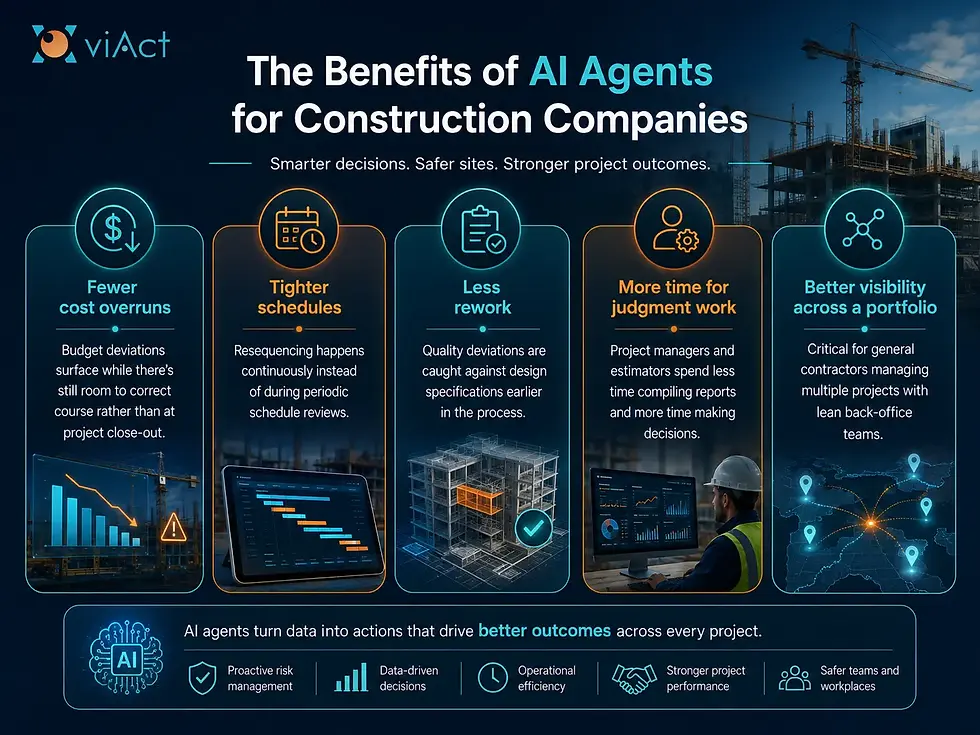
The common thread across all of these is speed of information — the same decisions get made, just earlier, with less manual effort spent getting to them.
How Should Construction Companies Get Started with AI Agents?
Most construction firms are still early here. Although project managers have mostly adopted general-purpose AI tools so far, very few teams are yet working with dedicated agents — and have identified agentic AI as the next major step for firms willing to move first. Contractors don't need to overhaul every system at once to see that value.
A more realistic path looks like this:
Start with the highest-friction workflow. Pick the process that consumes the most manual hours today — usually scheduling updates, cost tracking, or reporting — rather than trying to deploy agents everywhere simultaneously.
Check that the underlying data is usable. Agents are only as good as the data feeding them. If schedules, cost codes, and site data live in incompatible formats, that's the first thing to fix.
Pilot on a single active project. Prove the workflow on one site before rolling it out across a portfolio — it surfaces integration issues early and builds internal confidence in the output.
Choose a platform built for the industry, not a generic AI tool retrofitted for construction. Purpose-built libraries, for instance, viAct offers over 300 pre-built AI modules supported by AI agents for contractors in the built environment, which can cut down the setup work considerably compared to building workflows from scratch.
Involve field teams early, not just the office. Adoption tends to fail when agents are configured around head-office reporting needs without accounting for how superintendents and foremen actually work day to day.
Conclusion: Key Takeaways
AI agents extend from answering questions to continuously monitoring and acting across scheduling, cost, design, and quality data, each built from the same core parts: a trigger, a data source, a reasoning layer (LLM or VLM), an action, and a human checkpoint.
They apply across the full project lifecycle — from pre-construction design through field execution to post-construction maintenance — not just one function.
The seven use cases above (design optimization, scheduling, cost estimation, quality control, predictive maintenance, documentation, and decision support) cover where most construction companies see the fastest return.
Getting started doesn't require a full-scale rollout — a single high-friction workflow, piloted on one project with clean underlying data, is a realistic starting point.
For construction companies juggling multiple sites and thin back-office teams, AI agents for general contractors offer a way to bring project and field operations into one connected view.

Quick FAQs
1. What are AI agents in construction, and how are they different from generative AI chatbots?
Generative AI chatbots answer questions and generate content when prompted. AI agents build on that same underlying technology but operate continuously — monitoring project data and taking action, such as adjusting a schedule or flagging a cost deviation, without waiting for someone to ask.
2. Which parts of a construction project benefit most from AI agents?
3. Do AI agents replace project managers or estimators?
No. They reduce the time spent compiling and cross-checking information manually, freeing project managers, estimators, and superintendents to focus on decisions rather than data gathering.
4. How is this different from AI agents used for construction safety monitoring?
Safety-focused AI agents concentrate on real-time hazard detection and incident prevention using computer vision. The use cases here focus on project and field management — design, scheduling, cost, and quality — which is a separate (though complementary) part of how AI agents support a construction company.
5. How can a general contractor start using AI agents?
Start with a single workflow that currently takes the most manual effort — often scheduling or cost tracking — pilot it on one active project, and expand once the data pipeline and team adoption are proven out.
Read More:

Generative AI improving defect detection in construction is a strong use case. Visual models there face the same challenge as aim trainers: precise, real-time feedback. That’s why tools like Play okiaimx online focus on reaction and crosshair control. Curious whether similar feedback loops could speed up inspection training too.
Sourced build custom software for project and internal tools I had the opportunity to utilize custom software developed for our internal project management tools, and the experience has been nothing short of transformative. The intuitive interface significantly enhanced our team's efficiency, allowing for seamless collaboration and streamlined workflows. The software's tailored features addressed our specific needs, resulting in a marked improvement in productivity and communication. Additionally, the responsiveness of the support team ensured that any issues were promptly resolved, further enhancing our overall satisfaction. I highly recommend investing in custom software solutions for any organization seeking to optimize their internal processes.
Mình có lần lướt đọc mấy trao đổi trên mạng شيخ روحاني thì thấy nhắc nên cũng tò mò mở ra xem thử cho biết. Mình không tìm hiểu sâu جلب الحبيب chỉ xem qua trong thời gian ngắn để quan sát bố cục جلب الحبيب cách sắp xếp شيخ روحاني các mục và trình bày nội شيخ روحاني dung tổng thể. Cảm giác là các phần được trình bày khá gọn, các Huren Berlin mục rõ ràng nên đọc lướt cũng không bị rối với mình như Hurentest Berlin vậy là đủ để nắm tin cơ bản rồi. جلب الحبيب
,
,
The distinction between AI that responds to questions and agents that continuously monitor data is important, especially on projects where information is scattered across multiple systems. The ability to identify schedule or cost issues early could save teams significant time while keeping human decision-makers in control. That same shift toward proactive, data-driven tools is useful in gaming too, where Blox Fruits trade analysis can help players evaluate values before making a decision.
La publicación ofrece información sobre Pick 3 hoy de una manera sencilla y comprensible. Los resultados pueden revisarse rápidamente y la organización de los datos facilita la consulta. Me parece útil este formato porque permite encontrar información específica sin tener que recorrer demasiado contenido.